7 min read
Progressive Web Apps in Mendix

Introduction
Did you know that you can build progressive web apps with Mendix? And that doing so is simpler and cheaper than building a native mobile app? In many cases, a progressive web app (PWA for short) is a good or even better alternative to a native app that has to be installed from an app store. A PWA is an application that combines the flexibility of a website with the user experience of a native app. You can think of it as a native app that runs in a browser, just like a website. So what exactly are the benefits of a PWA? Are there limitations you need to take into account when developing an app? And how do you build a PWA in Mendix? You can read all about it in this blog.
What exactly is a Progressive Web App
A Progressive Web App is a relatively new type of web application that uses modern web technology, giving it a better user experience than traditional web applications. The concept was introduced in 2015 by Google Chrome developers. In the years that followed, other browsers also started supporting this type of application. Today, PWAs work in all major browsers, on both mobile devices and desktops.
You can see a PWA as an evolution of web applications. Unlike traditional web applications, a PWA offers more functionality that is comparable to a native app, such as:
- A PWA can use features available on mobile devices, such as the camera, microphone, GPS and push notifications.
- A PWA can be added to the home screen as an app icon (tile).
- When a PWA is opened from a tile on the home screen, the app looks like a mobile app because the browser's user interface is hidden.
- A PWA can work partially or fully offline when the internet connection is poor or there is no internet at all. As a user, you could for example submit a form in a PWA while you are offline.
- A PWA can store data locally on the device, and that data can be synchronized automatically with the server as soon as the device is back online.
- In an offline PWA, user sessions stay active much longer than on regular websites, even after the app has been closed on the device.
Thanks to these properties, progressive web apps offer a user experience comparable to a native app, and they are often used for mobile applications. They can also be used for websites and desktop applications. Several well-known companies have converted their website into a PWA, so that the app feels like a native app in a mobile browser, while working as a “normal” website in a desktop browser. Well-known examples are the web apps of Uber, Spotify and Pinterest.
Benefits of Progressive Web Apps
A progressive web app offers advantages over a native mobile app, both for the app developer and for its users. The most important benefits are listed below.
No more app store distribution
The most important difference and advantage of a progressive web app compared to a native mobile app is that a PWA does not need to be distributed through an app store. A PWA can simply be opened in a browser without first installing the app from an app store. This makes a PWA much more accessible to users. As an app developer, you are also no longer dependent on an app store.
Always working with the latest version
Users of a progressive web app no longer need to update the app from the app store to use the latest version. As a user, you always work with the latest version of the app, because you open it in a browser. This makes rolling out bug fixes and new features much easier than with a native mobile app.
Lower development costs
Although it is not strictly necessary, in practice you often see separate versions of a native app being developed for different mobile platforms (Android and iOS). With a progressive web app, that is no longer needed. You can therefore save time when developing a PWA, and in many cases development costs will be lower than for a native app.
Are there limitations?
After reading about the benefits of progressive web apps, you may be wondering whether there are limitations that you would not have with a native mobile app. There are indeed, and you can read about them below:
Not all device features are supported
Progressive web apps cannot yet use all device features available on phones and tablets. For example, it is not possible to use Bluetooth, NFC or Face ID. Some device features are available on Android but not on iOS. Because of these platform-specific limitations, it is important to research in advance which features are supported on which platform before deciding whether to develop a PWA or a native app.
Limited data storage for offline use
In general, the storage capacity of a progressive web app is smaller than that of a native app. Storage capacity is limited by the browser in which the app is opened. As a result, a PWA cannot make unlimited use of the available storage on the device, whereas a native app can. The storage limit differs per browser and can also vary per operating system version. Here too, it is important to research the storage limitations in advance and to estimate how much application data (including photos, videos, etc.) you expect to store when your app is used offline.
Safari limitations
While browsers such as Chrome, Firefox and Edge quickly implement the latest features, Safari often lags behind. This delay can range from a few months to even years, depending on the specific web standard or API in question. Apple subjects potential features to a rigorous evaluation to guarantee compatibility, security and privacy, but this thoroughness slows down the adoption of new features. As a result, some PWA features work on Android but not yet on iOS. One example is background execution, which runs tasks in the background while the app is not actively being used. This is not possible on an iOS device, whereas it is possible with a PWA on Android.
How do you build a Progressive Web App in Mendix?
Step 1: Create a new Mendix project
The first step is to create a new project for your PWA in Mendix. You then need to choose a starter template, and you pick the ‘Blank Web App’ template. This template contains various widgets, building blocks and page templates for both responsive web applications and PWAs.
Step 2: Set up the navigation profile
Your new app contains the default ‘Responsive Web’ navigation profile. Once you have opened the app in Mendix Studio Pro (the Mendix development environment), you can adjust the navigation profile in the app settings. In the navigation profile, select the ‘Publish as Progressive Web App’ option. In principle, this is the only thing you need to configure in Mendix to publish the app as an online PWA.
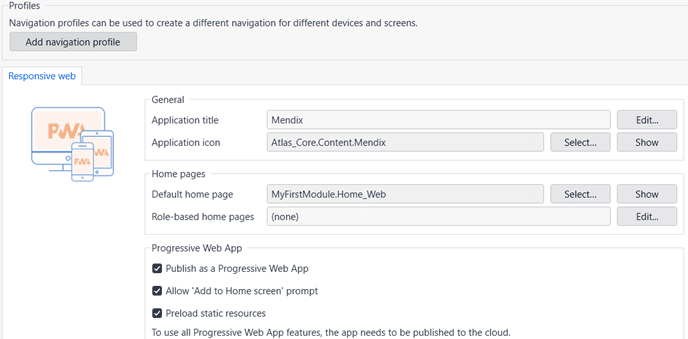
Navigation profiles for PWA in Mendix
Step 3: Model the app in Mendix Studio Pro
After step 2, you have an empty app without a user interface. As an app developer, you can design your application in Mendix Studio Pro without any programming knowledge. In the visual development environment, you model the application using the same concepts as for a “normal” online web app (domain model, pages, microflows, nanoflows, etc.).
Step 4: Publish the app to the cloud for testing
To test how your PWA works, the app needs to be published to the cloud. Publishing your application to Mendix Cloud is the easiest option and takes just a few clicks. Once that is done, you can open the app in a browser on your desktop, tablet and phone.
After this step, you have an online PWA that can be opened on any type of device. The steps described below are optional and depend on the type of PWA you want to build.Step 5: Add navigation profiles for tablet and phone (optional)
If you want to add separate user interfaces for tablets and phones to the app, you need to add extra navigation profiles in Mendix Studio Pro. The default ‘Tablet Web’ and ‘Phone Web’ profiles are available for you to select. When the app is opened in a browser, Mendix automatically determines which type of device is being used and loads the corresponding navigation profile. If the profile for that device type is not found in the app, the default navigation profile is loaded automatically.
Step 6: Set up offline mode (optional)
To make your PWA work without an internet connection, you need to add one or more offline navigation profiles to the app. Default profiles are available in Mendix for this too. You can choose ‘Responsive Web Offline’, ‘Tablet Web Offline’ and ‘Phone Web Offline’. This makes the app behave like an offline mobile app and creates a local database on the device when the app is opened in a browser. After choosing an offline navigation profile, you can configure in Mendix Studio Pro how application data is synchronized between the server and the local database.
Step 7: Configure synchronization (optional)
Mendix offers several options for configuring data synchronization. As an app developer, you have various ways to determine which datasets should be synchronized and when. In principle, synchronization always takes place when pages are opened in the app while the device is online. If there is no internet connection, an offline PWA loads the pages with data from the local database. You can also configure specific datasets to be synchronized in the background when the app starts up and the device is online. Synchronization can also be forced by the user with a button in the app, or run automatically in the background with a nanoflow.
Step 8: Add push notifications to your PWA (optional)
To send push notifications to the users of your PWA, you need to add the additional ‘Push Notification Connector’ module to the app. This module was developed by Mendix and can easily be downloaded from the Marketplace in Studio Pro. The module works together with Google’s Firebase Cloud Messaging (FCM) to send notifications. Until recently, it was only possible to send push notifications to users with an Android device. Thanks to recent updates by Apple to the iOS operating system and the Push Notification Connector module in the new version of Mendix, it is now also possible to send push notifications to iOS devices. After adding the module to your app in Mendix, a number of settings need to be configured in Mendix and in FCM to establish the connection between the app and the FCM API. Using FCM Cloud Messaging is free, by the way.
Conclusion
In many cases, a progressive web app is a good alternative to a native mobile app. It combines the flexibility of a website with the user experience of a native app and offers benefits for both users and app developers. Developing a PWA in Mendix takes less time than a native app, and you are no longer dependent on an app store to distribute your app to users. For an offline mobile app, a PWA does still have some limitations compared to a native app that you need to take into account.
Want to know more about Mendix?
Are you considering developing a web app with Mendix, or having one developed? Or do you already have an online web app that you would like to convert into a PWA? We are happy to advise you and think along about the possible applications of Mendix for your specific situation. Get in touch with one of our account managers for an introductory meeting.
Stay up to date
Want to stay up to date with all the ‘Discover the building blocks of Power Apps’ blogs? Then sign up for our newsletter. You will receive all the latest content straight to your inbox every month. You can sign up using the button below.

Written by

Steven Samuels Brusse